Verba Manent IAby Punto Web FerraraNotify me
From the lecture to the exam

Words fly away.
Notes remain.

It records the lecture, gives you the notes and takes you all the way to the exam: with the lecturer's real voice, a tutor that knows when your exam is and the tools for dyslexic students. Everything stays on your device.

Recordings stay on your deviceNo voiceprintsBuilt-in dyslexia modeTranscribes English and many other languages
Verba Manent IA
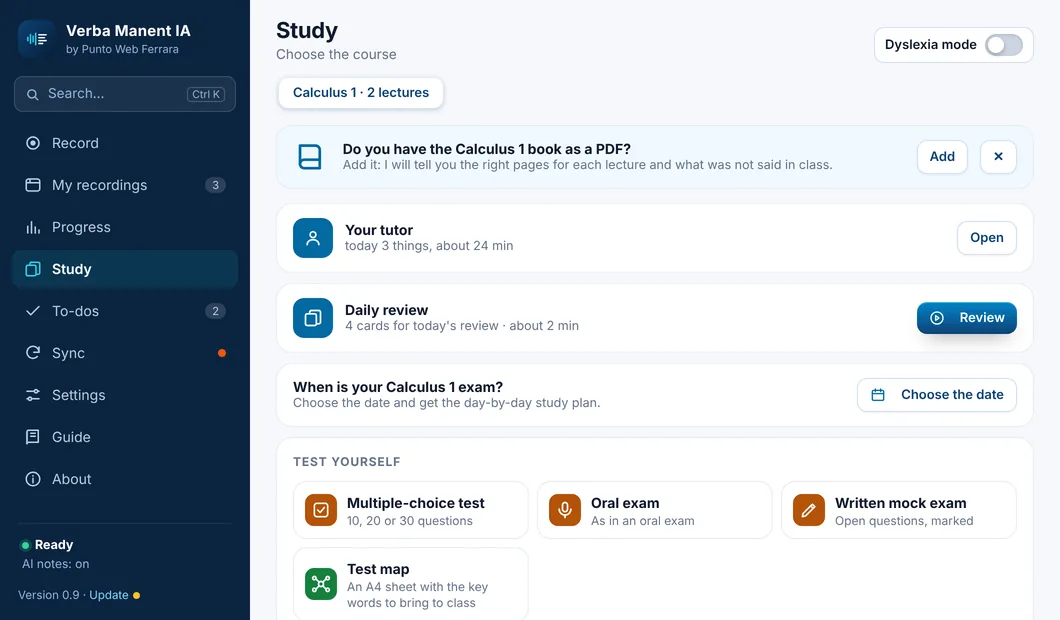
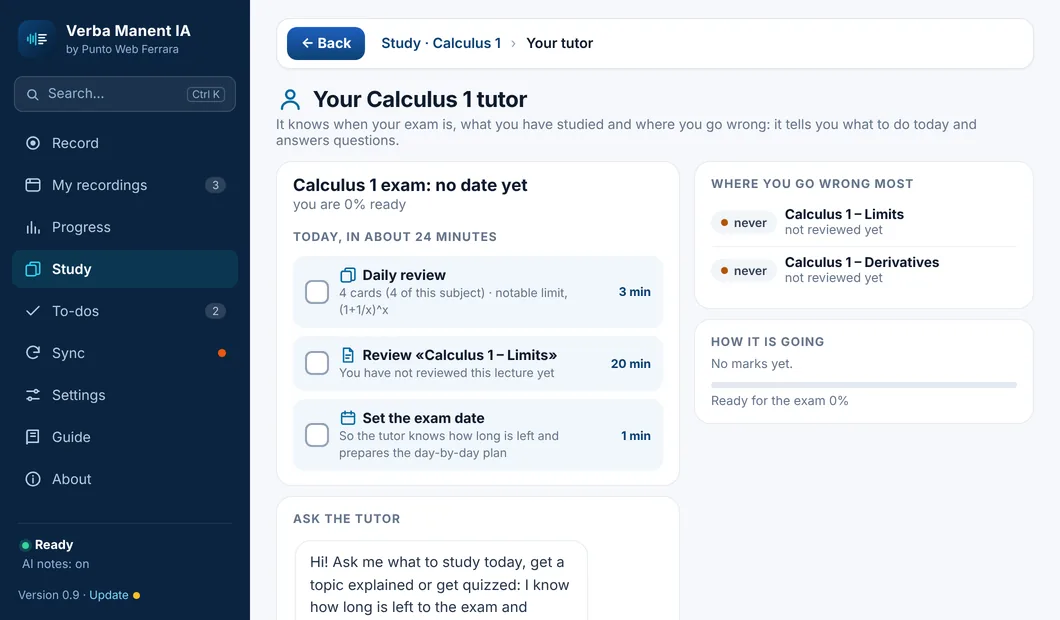
The Study page of Verba Manent IA
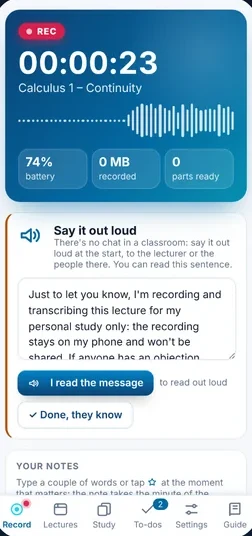
Recording on the phone
3moments: in class, after class, before the exam
5devices: Windows, Mac, Android, iPhone, web
2apps: Verba Manent IA and Scripta Manent
0recordings we receive

The study method

Notes written with a method, not at random

Many AI summaries are a list of abbreviations and numbers: «a phrase here, a phrase there». They are quick to read but hard to study. Verba Manent IA notes follow six rules taken from research on how people learn and from plain-language guidelines.

Tap to compare
What is a contract and when is it valid?
A contract is the agreement through which two or more parties create, change or end an economic relationship, and it is valid only if it has all four requirements.
  • It is defined by article 1321 of the Italian Civil Code (c.c.): at least two parties must agree.
  • There are four requirements: agreement, cause (the economic purpose), object and, when the law asks for it, form.Why: if even one is missing, the contract is void, meaning it has no effect at all.
  • Form is usually free, but for some contracts the law requires writing «ad substantiam» (or the contract is void), for example selling a house.Why: important goods need solid proof that lasts over time.
Summary in 3 sentences
  1. A contract is an economic agreement between at least two parties.
  2. It needs four requirements: agreement, cause, object and, sometimes, form.
  3. If one is missing, the contract is void.
1

Abbreviations explained where they are

Every abbreviation and technical term is explained in brackets the first time it appears, right there. No hunting for footnotes.

Source: Split-attention effect, cognitive load theory (Sweller)
2

Words first, then reasoning

New words are explained before they are used. When the reasoning comes, you already know what it is about.

Source: Pre-training principle (Mayer)
3

One topic per question

Each question covers one thing, and each point says one idea. You see right away where one concept ends and the next begins.

Source: Segmenting and signaling principles (Mayer)
4

The idea first, then the details

Every answer opens with one sentence that states the idea. If you know it, you see it at a glance; if not, the details are right below.

Source: Plain language, ISO 24495-1:2023
5

The why, not just the what

Where it helps, the reason is right under the point. Understanding why something is so helps you remember it far more than repeating it.

Source: Elaborative interrogation (Dunlosky et al., 2013)
6

Full sentences, no hieroglyphs

No arrows, symbols or clipped words instead of sentences; every number has its unit. The same rule helps students with dyslexia.

Source: W3C guidance on abbreviations and clear language

It applies everywhere: Cornell notes, Exam Format, flashcards, quizzes, glossary and tutor answers, in Verba Manent IA and Scripta Manent.

What's more

Four things other apps don't have all together

The lecturer's real voice

Hear your lecturer again, not a fake voice

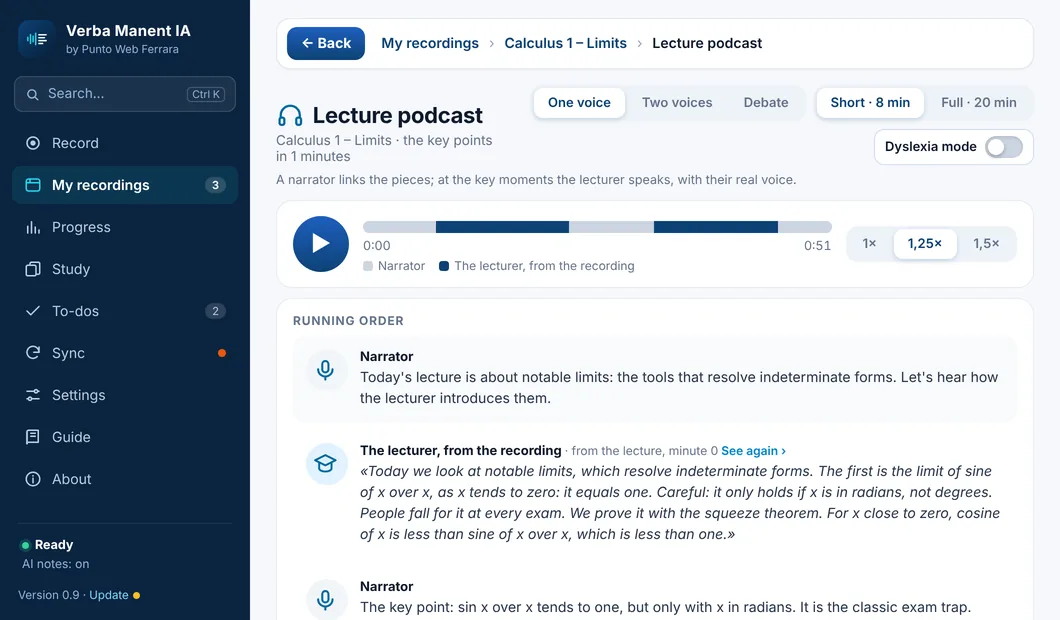
The lecture podcast, the Karaoke with words lighting up, the glossary with «▶ Hear the lecturer»: at the moments that matter it's them speaking, with their own voice, from the recording.

Podcast with one voice, two voices or a debateThe slide of that moment always alongside
Everything for studying →
Your tutor

It knows when your exam is and where you go wrong

Every day it tells you what to do, with the minutes: the daily review, the point of the lecture to listen to again where you went wrong, the oral exam if you haven't done one for days. And you can ask it to quiz you.

Days to the exam and «how ready you are»Mistakes in tests and oral exams, with lecture and minute
Everything for studying →
For dyslexic students

Scripta Manent, the sister app for dyslexia

Everything written large and read aloud: lessons easy to listen to, homework from the planner, maths in small steps, the test plan and the week for parents. In Verba Manent IA you find all of it in «Dyslexia mode».

OpenDyslexic, soft backgrounds, explanations read aloudTest map and a sheet for IEP, 504 or Learning Support Plan meetings
All about Scripta Manent →
Real privacy

Your lectures stay yours

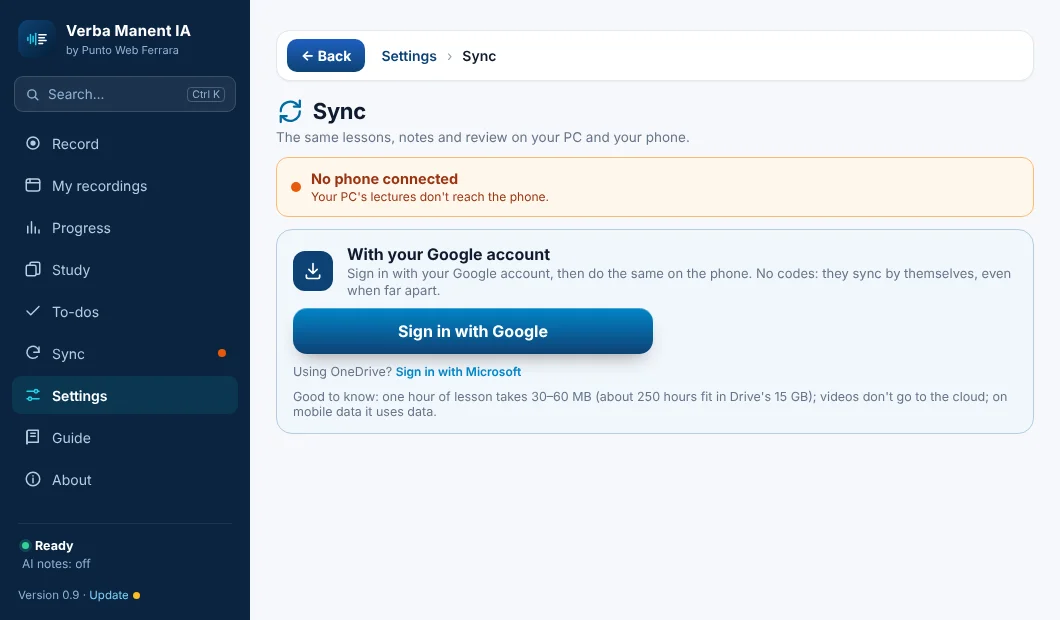
Transcription happens on your device. PC and phone sync through your Google Drive with password-locked zips: not even Google knows which lectures you have.

No voiceprints, no AI trainingNo bot joins the meeting
All about privacy →

Ready right away

You record. The notes write themselves.

Start recording and just listen. When the lecture ends, your notes are ready.

Transcribes while you record, on your PC or phoneNotes written by Claude, the AI by AnthropicIn the lecture hall too, from the microphone

Highlights

From one lecture or meeting, all of this

Record once and Verba Manent hands you material ready for studying or working. These are real screenshots.

Notes

Cornell notes

The world's most widely used study method: questions and keywords on the left, notes on the right, summary at the bottom. With the lecturer's slides in the right place and the minute of the recording.

  • PDF ready to print or read on a tablet
  • Formula sheet with symbols and articles
  • «To check» where the audio was unclear
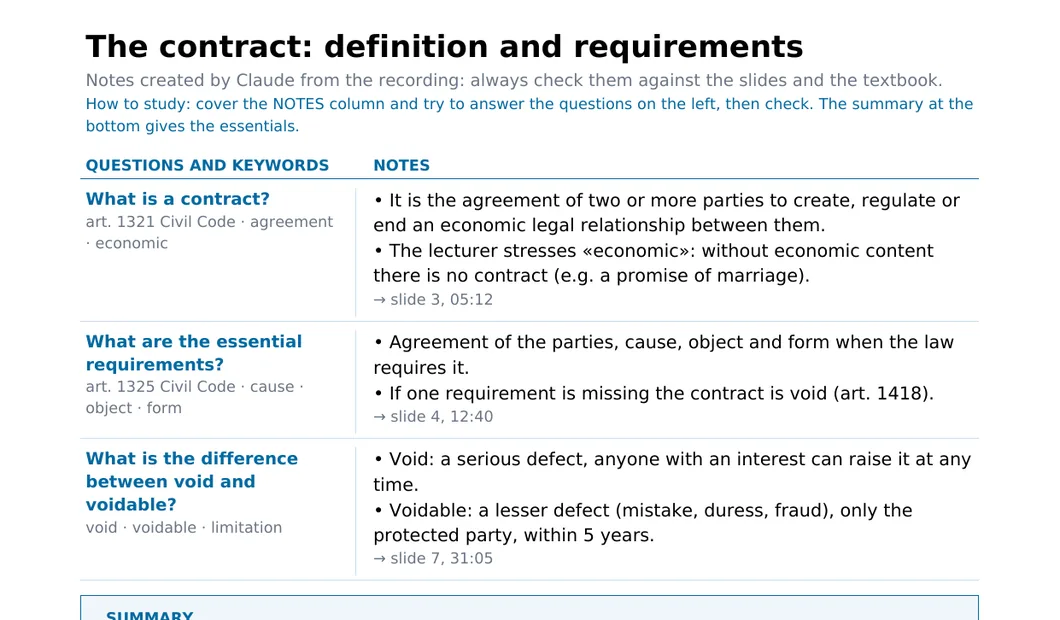
A page of Cornell notes: questions on the left, notes on the right.

Exam

Exam-ready format

The most likely questions, ranked with stars, each with an answer outline, the keywords to mention and the mistake to avoid.

  • ★★★ when the lecturer insisted on it
  • Answer outline point by point
  • And if you like, a format you describe yourself
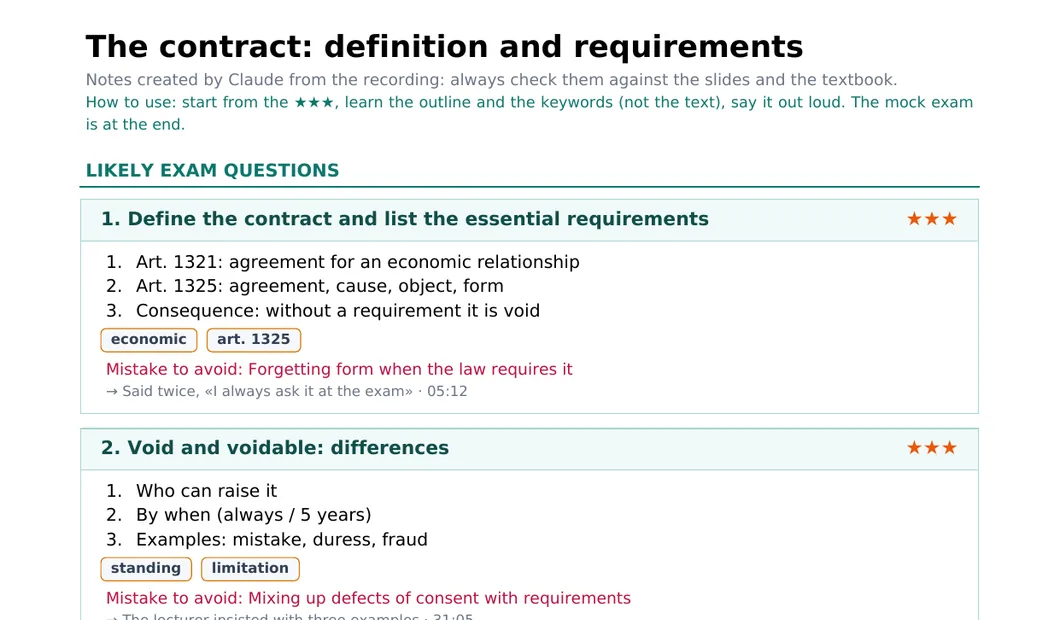
Exam-ready page with likely questions, stars and answer outlines.

Review

Mind map

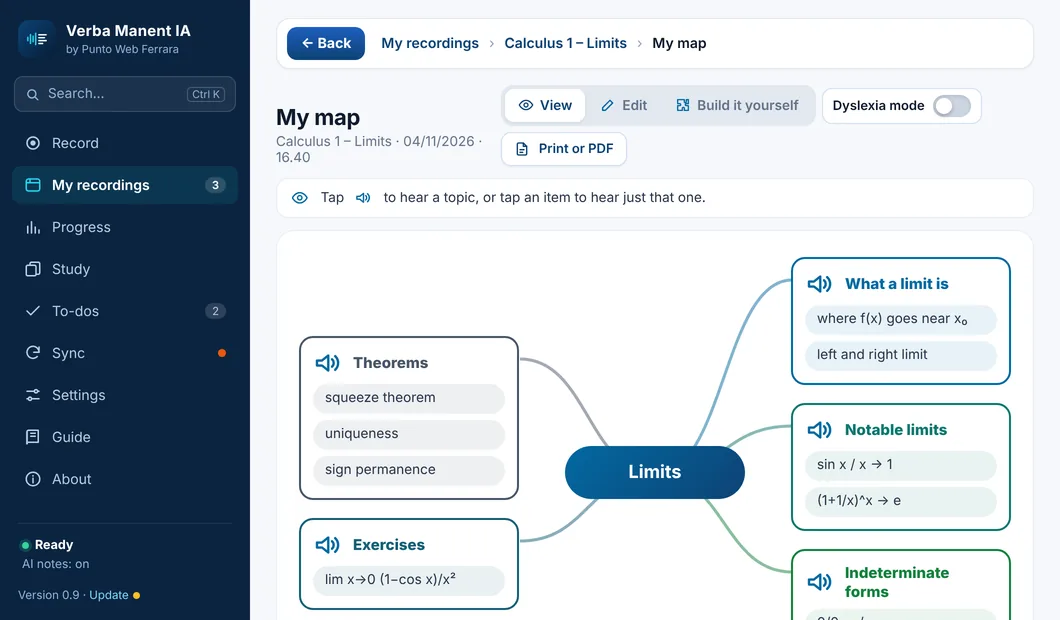
The whole lecture at a glance: the topic in the centre, the subjects around it, the concepts to remember on each branch.

  • Created from the lecture in one tap
  • Change it or build it yourself, by voice too
  • Perfect for quick review
Mind map of the lecture on contracts, with six coloured branches.

Review

Flashcards and review

The lecture's questions become cards to flip. You say «I knew it» or «Review again», and the ones you miss come back until you know them.

  • The ones to review first, then the rest
  • On your phone too
  • One lecture, one subject or all of them, with the date of each lecture
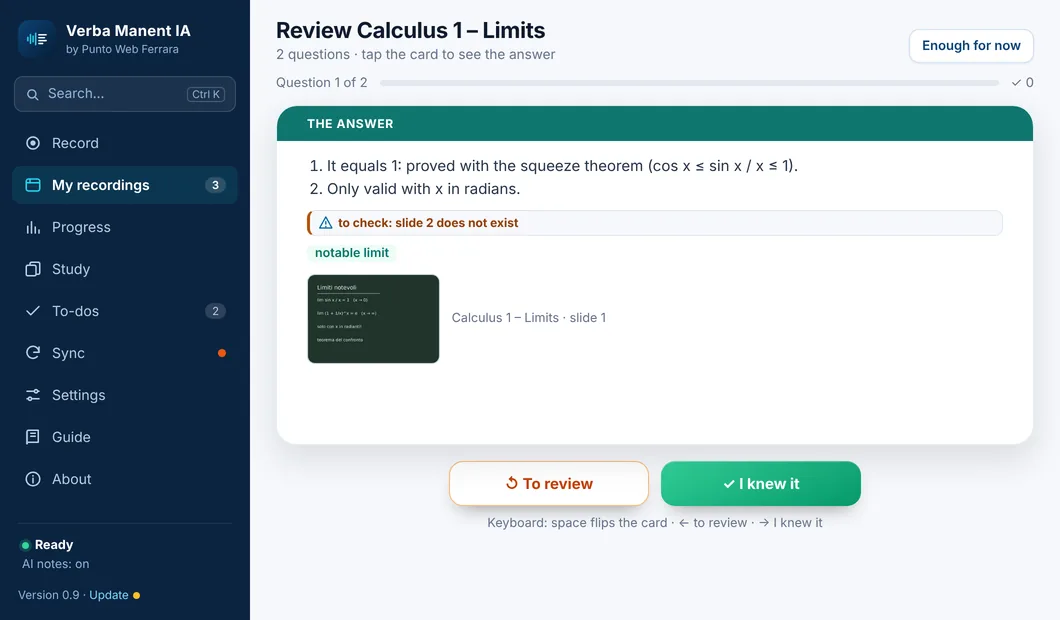
Reviewing with flashcards: the question, «Review again» and «I knew it».

Review

Cornell review: real revision

The lecture's Cornell sheet with the notes covered. Read the question, answer out loud, tap and see if you knew it. The questions you missed come back tomorrow in the Daily review.

  • Cover, answer out loud, uncover
  • One lecture or the whole subject, one after another
  • The summary at the end, in your own words
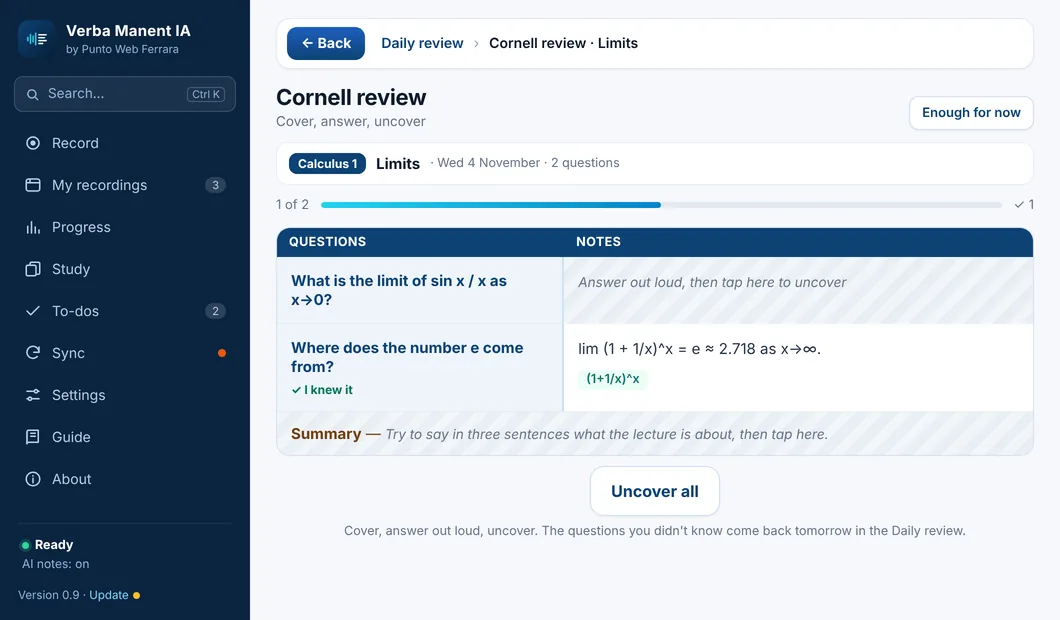
Cornell review: questions on the left, notes covered on the right, «I knew it» on the question already uncovered.

Exam

Mock exam with a grade

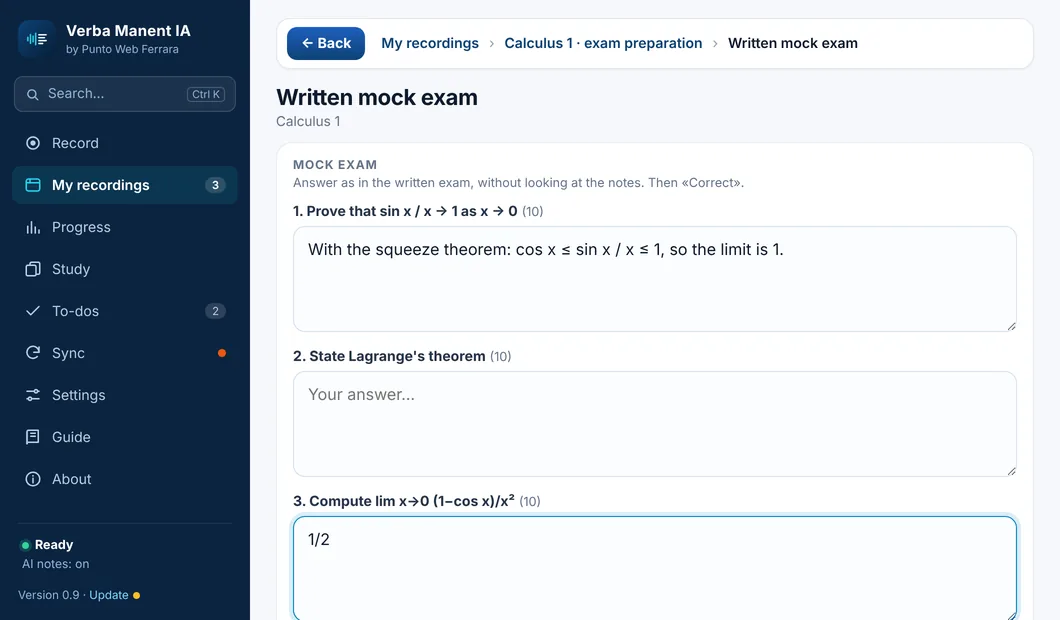
Answer in writing as in the real exam: each answer gets a score, what you got right and what's missing. A grade at the end.

  • Score for every question
  • What your answer is missing
  • Grades are kept: see if you improve
Mock exam with written answers and the score for each.

In class

Your notes, at the right minute

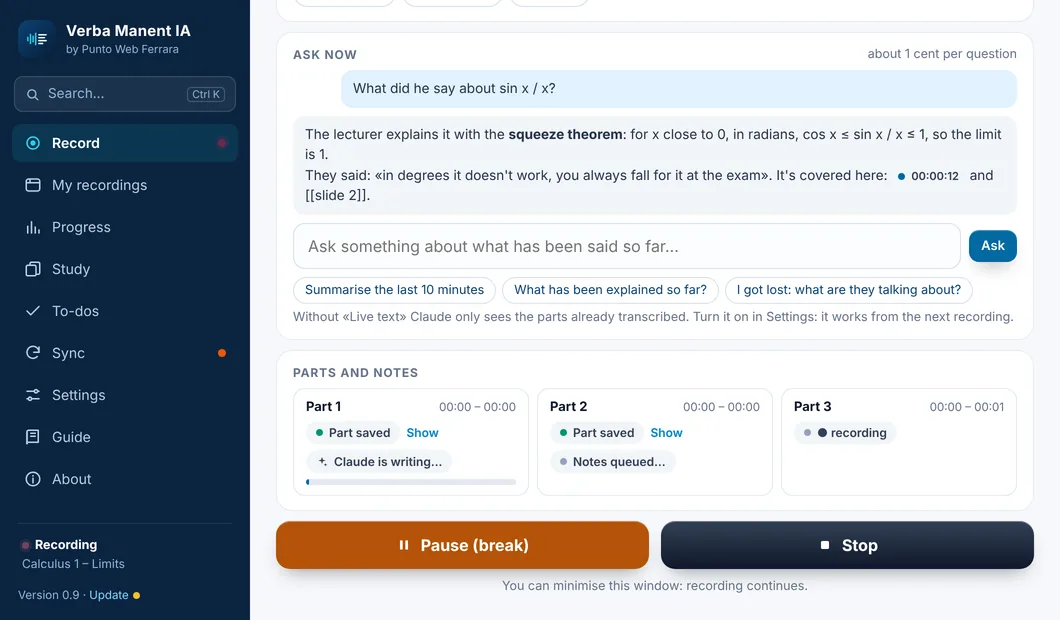
During the lecture type a couple of words or tap «Important», «To clarify», «To do»: the note takes the exact minute and Claude uses it in your notes. And if you lose the thread, ask «what are they talking about?».

  • A star at the moment that matters
  • Your doubts end up in your notes
  • «Ask now» while recording
Notes written during the recording, each with its minute.

Meetings

Meeting minutes that write themselves

Minutes are the written record of a meeting. Record the meeting (on Meet, Teams, Zoom or in the room) and at the end Verba Manent hands them to you already written: what was decided, who has to do what and by when, what's still open and when you meet next. Nobody has to take notes anymore.

  • Ready when the meeting ends, as a PDF
  • Send them to participants in one tap: email, Word, Google Docs
  • Tailored: sales meeting, residents' association, interview…
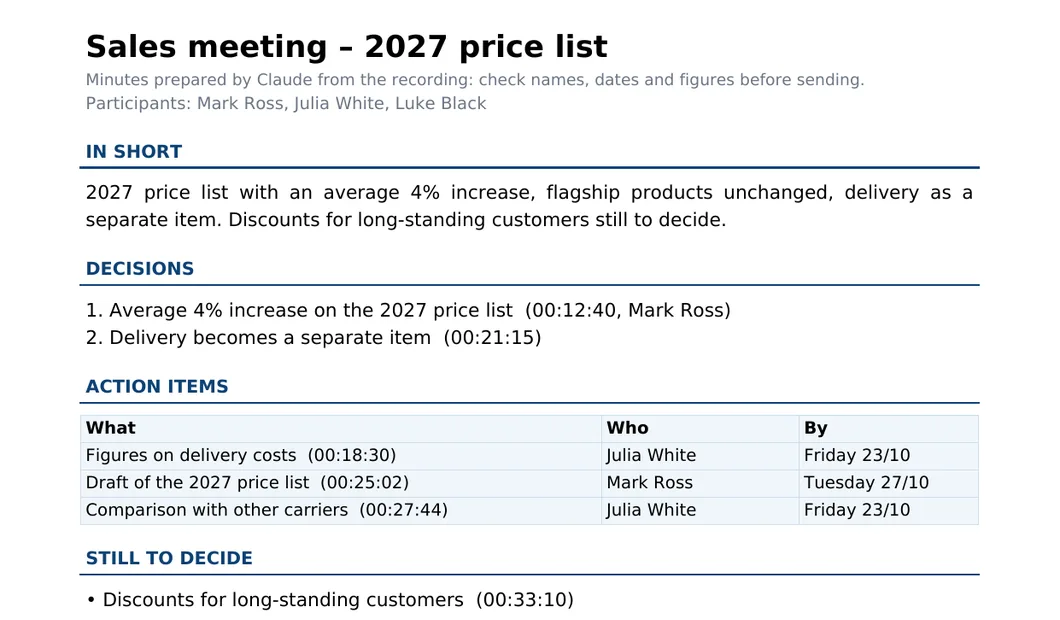
For meetings → Meeting minutes with summary, decisions and the action items table.

How you're doing

Progress: how you're doing

One page to see where you stand: hours recorded week by week, days left to each exam, test scores, your review streak and what is still to fix.

  • Upcoming exams with how much of the study plan is done
  • Test scores subject by subject
  • For work too: meetings, to-dos, decisions
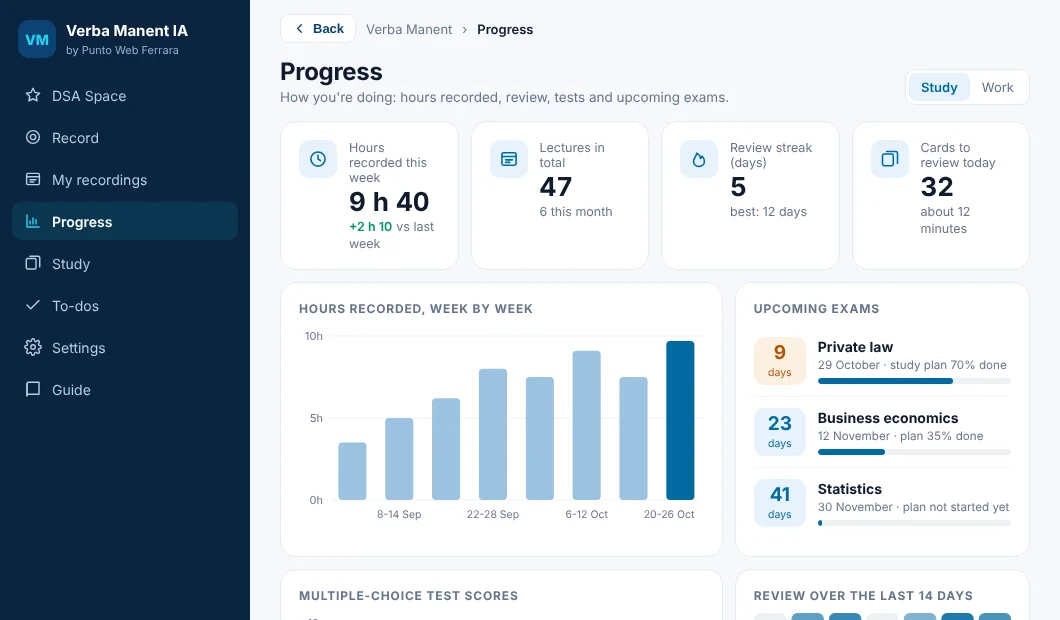
The Progress page: hours recorded, upcoming exams, review streak and cards to review.

For students with dyslexia and other learning differences

Scripta Manent: the study app for students with dyslexia

Dyslexia, dysgraphia, dyscalculia and ADHD-friendly study. Scripta Manent records the lecture and makes it easy to read and to listen to. Then it helps you with homework, maths and all the way to the test. It is the sister app of Verba Manent IA, made just for students.

WindowsAndroidiPhoneWebInside Verba Manent IA: «Dyslexia mode»Mac
Scripta Manent
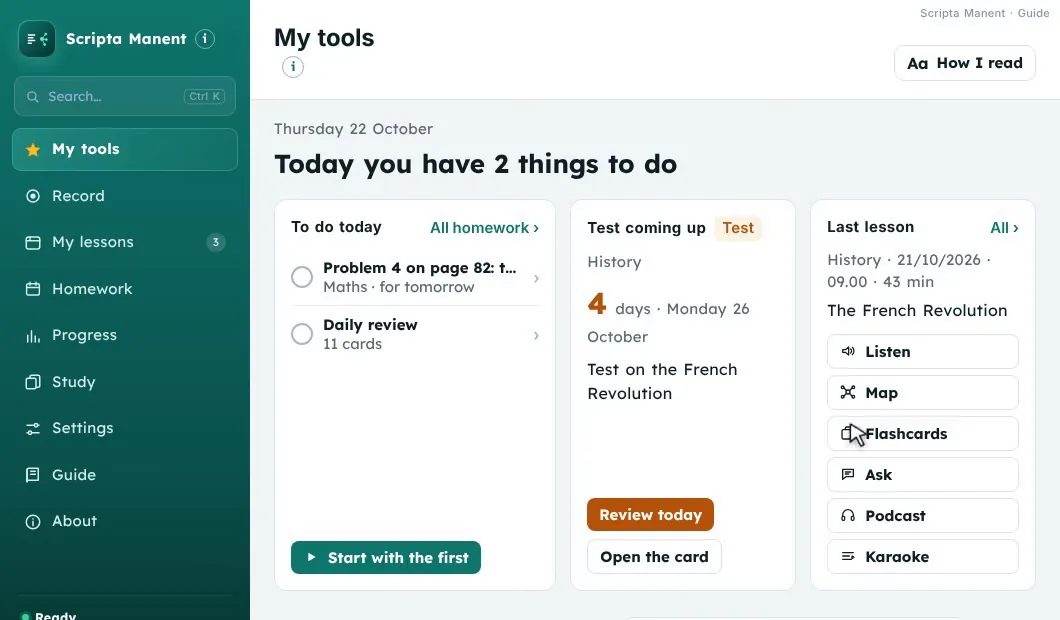
My tools: it always opens here
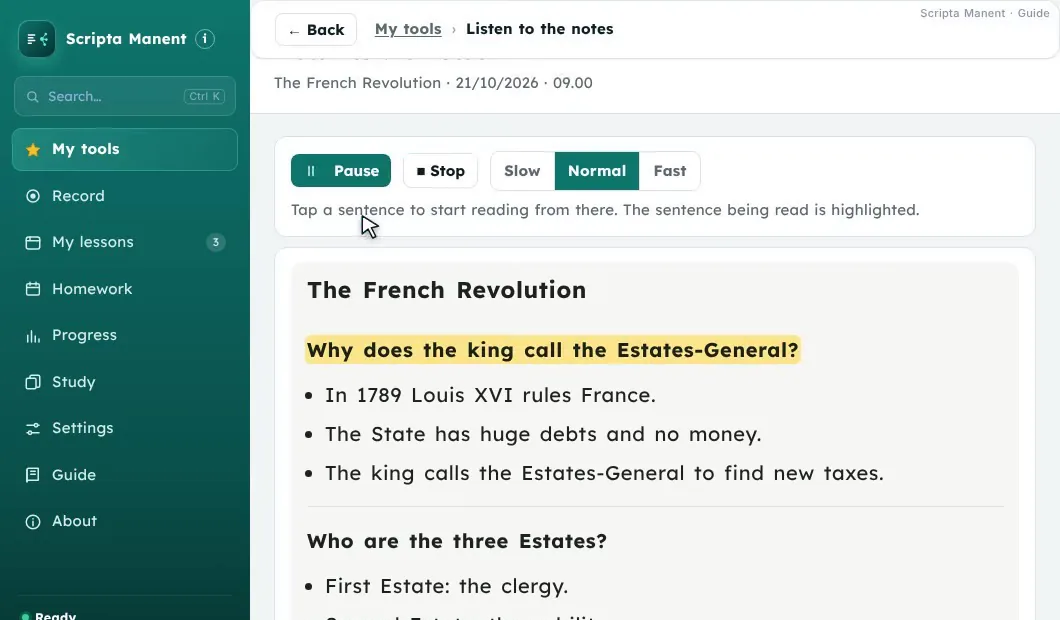
Scripta Manent reads the notes aloud and highlights the sentence you hear.

Listen and Karaoke

The notes read aloud, with the sentence you hear lighting up. In Karaoke the teacher speaks, with their real voice, one line at a time.

Slower or fasterEasy notes: questions, keywords, slidesTap a chapter and hear the teacher from there
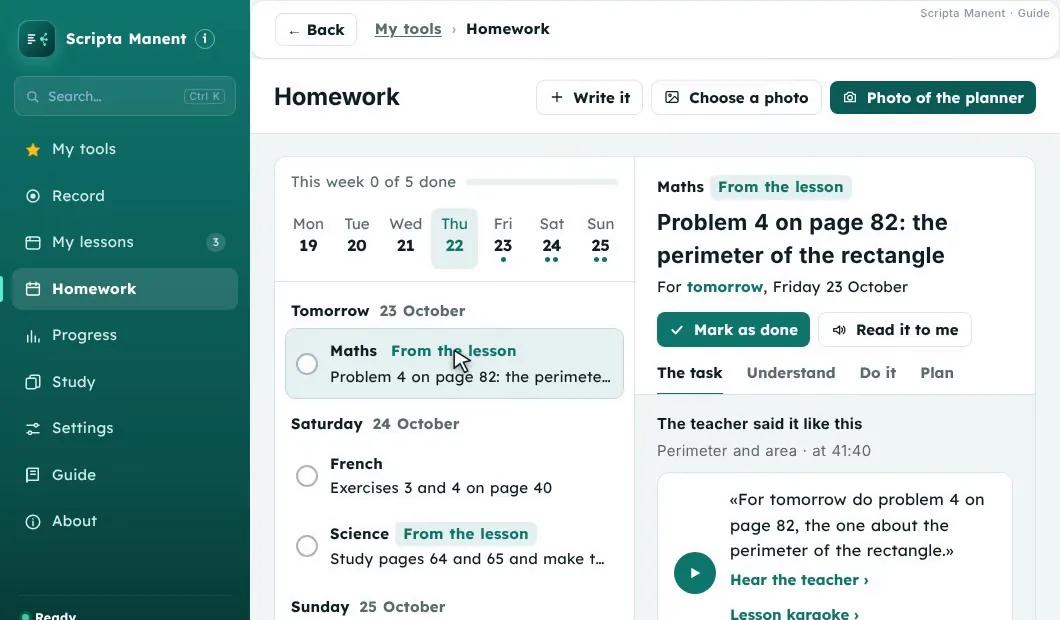
The Homework page with the week, the day's homework and the task card split into pieces.

Homework: take a photo of your planner

One photo of your planner and the homework is sorted by day. It also arrives by itself from the lessons: when the teacher sets homework, Scripta Manent finds it.

Understand: what it asks, in simple wordsDo it: split into small pieces, with the timeRemind me, Done, Move
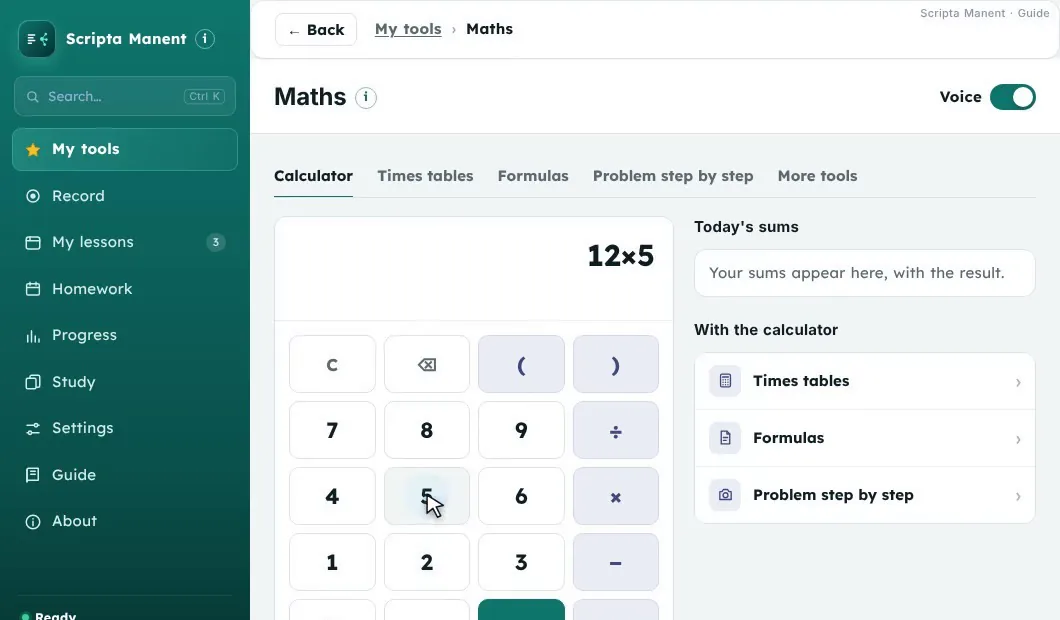
Scripta Manent maths with the talking calculator.

Maths

The calculator that talks and reads the calculation back, times tables aloud, the formula sheet and the problem split into small steps. Take a photo of your working and it tells you if the result is right.

Formulas for shapes and those from your lessonsProblem step by step, with «Ask about this step»Fractions to see, percentages, converter
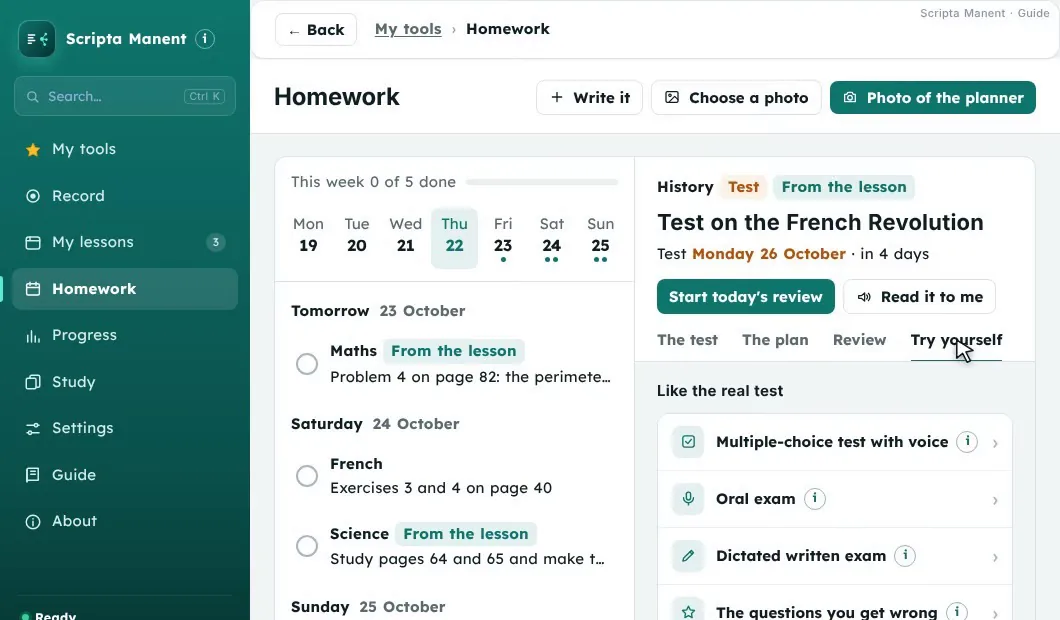
The test plan with the minutes a day and the days of the week.

The test: the plan, day by day

Mark the test and choose what it covers: lessons and textbook pages. Scripta Manent makes the plan with the minutes a day you choose and reminds you every day of today's piece.

Multiple-choice tests and spoken oral testThe questions you get wrong come back soonerTake a photo of the marked test and understand the mistakes

How it works

Three steps, no effort

Press play: these are the guide videos built into the app. When one ends, the next one starts on its own.

Verba Manent IA · Guide

What it won't do

What others do, and we don't

Your lectures and meetings belong to you. Here is what Verba Manent will never do.

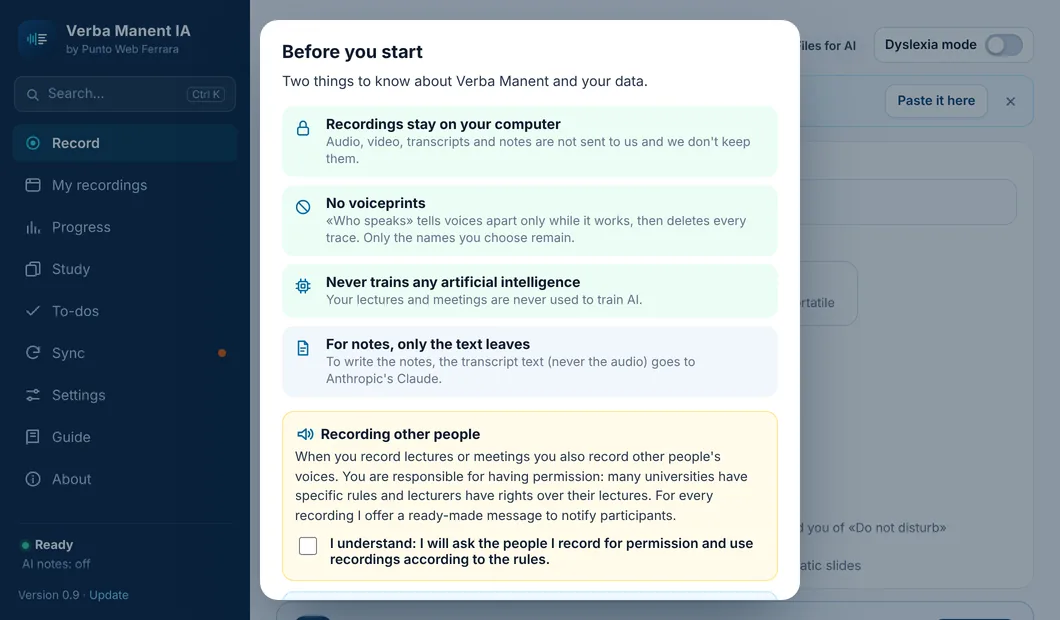
It never sends us your recordings

Audio and video stay on your computer. We don't receive them and we don't keep them.

It never sends audio over the internet

Transcription happens on your computer or phone. To create your notes, the AI only receives text. Only if you choose fast transcription on your own server does the audio go there, and it is deleted when the work is done.

It never trains any AI

Your lectures are never used to train artificial intelligence. Not ours, not anyone else's.

It never records in secret

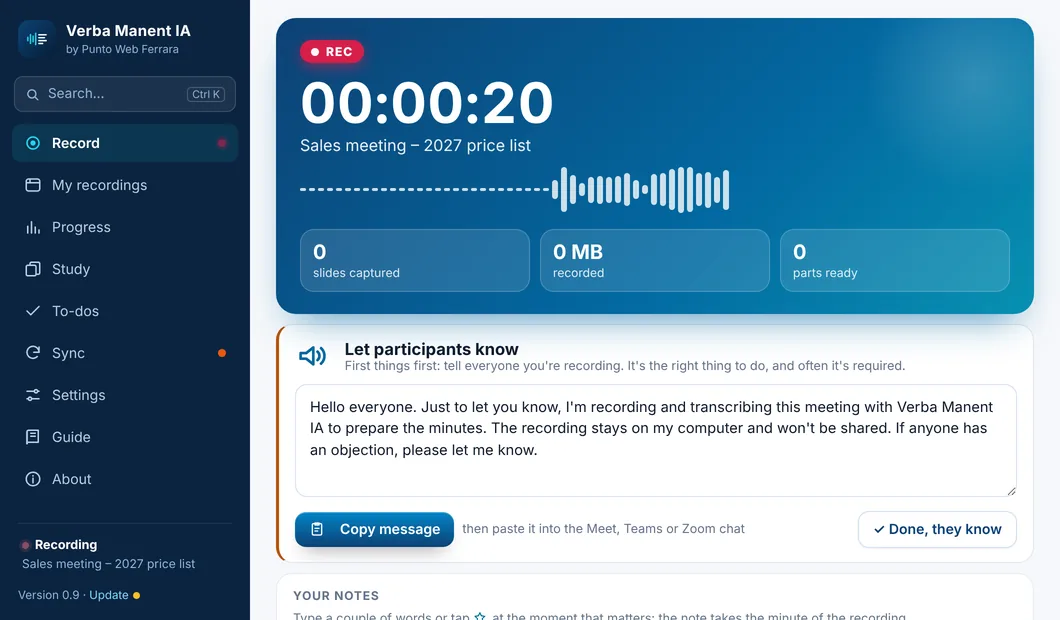
Every time you record, it offers a ready-made message to let the other participants know.

No biometric data. Ever.

“Who's speaking” tells voices apart only while it works, then deletes every trace. Verba Manent keeps no voiceprint.

All about privacy →
Verba Manent IA
The Before you start box with the privacy points
Verba Manent IA
The ready-made message to tell participants

Comparison

Verba Manent and other AI note-taking apps

Honest: including what they do better (syncing over the internet).

Verba Manent IANotabilityGoodnotesTurbo AINotebookLM
In class
Records from your PC or phone, with no bot in the callyou upload the file
Also records the screen and captures the slides by itself————
Transcribes on your device, free and offlinenot statednot stated—
Recognises who is speakingnot stated✓ in meetings——
Photo of the board linked to the minute of the lecturephotos in notesphotos in notes——
Imports video, audio, YouTube links and transcripts✓ YouTube—
After the lecture
Cornell and Exam Format notes, with the slides alongsidesummarysummarynotessummary
Notes written with a stated method: abbreviations explained where they appear, one idea per point, the why (see the method)————
Ask the lecture, with slide and minute✓ chat✓ chat✓ chat✓ with citations
Lecture podcast with the lecturer’s real voice✓ one voice, two voices, debate——synthetic voicessynthetic voices
Synced replay (Karaoke) with the slide✓ with your handwritten notes———
Mind map and infographic———
Course glossary with «Hear the lecturer»————
Before the exam
Flashcards and multiple-choice testsquizzes
Daily review up to the exam date————
Tutor that knows when your exam is and where you go wrong———tutor on your sources
Say your answer out loud and get feedback (viva practice)————
Textbook: the right pages for each lecture and what wasn’t saidPDF to annotatePDF to annotatePDFbook as a source
Export flashcards to Anki————
For dyslexia and other SpLDs
An app made for dyslexia (Scripta Manent, also inside Verba Manent IA): legible font, more space, soft background————
Coloured syllables and reading ruler————
Read to me: PDFs, photos and texts read aloud, with the sentence highlighted———audio summary
Write by speaking: dictate and the text gets tidied up————
My map: change it or build it, by voice too———read-only map
Test map on one A4 sheet————
Tests with questions read aloud and the extra time you set————
Dictated written exam: spelling costs no points————
A sheet for IEP, 504 and Learning Support Plan meetings, guides for parents and teachers————
For everyone
Meeting minutes with action items, who and by when—✓ action items——
Sync PC and phoneEncrypted Google Drive✓ over the internet✓ over the internet✓ over the internet✓ over the internet
DevicesWindows, Mac, Android, iPhone, webiPad, iPhone, Mac, Windows, AndroidiPad, iPhone, Mac, Windows, Android, webweb, iPhone, Androidweb, iPhone, Android

In class

Records from your PC or phone, with no bot in the call
Verba Manent IA✓
Notability✓
Goodnotes✓
Turbo AI✓
NotebookLMyou upload the file
Also records the screen and captures the slides by itself
Verba Manent IA✓
Notability—
Goodnotes—
Turbo AI—
NotebookLM—
Transcribes on your device, free and offline
Verba Manent IA✓
Notabilitynot stated
Goodnotes✓
Turbo AInot stated
NotebookLM—
Recognises who is speaking
Verba Manent IA✓
Notabilitynot stated
Goodnotes✓ in meetings
Turbo AI—
NotebookLM—
Photo of the board linked to the minute of the lecture
Verba Manent IA✓
Notabilityphotos in notes
Goodnotesphotos in notes
Turbo AI—
NotebookLM—
Imports video, audio, YouTube links and transcripts
Verba Manent IA✓
Notability✓ YouTube
Goodnotes—
Turbo AI✓
NotebookLM✓

After the lecture

Cornell and Exam Format notes, with the slides alongside
Verba Manent IA✓
Notabilitysummary
Goodnotessummary
Turbo AInotes
NotebookLMsummary
Notes written with a stated method: abbreviations explained where they appear, one idea per point, the why (see the method)
Verba Manent IA✓
Notability—
Goodnotes—
Turbo AI—
NotebookLM—
Ask the lecture, with slide and minute
Verba Manent IA✓
Notability✓ chat
Goodnotes✓ chat
Turbo AI✓ chat
NotebookLM✓ with citations
Lecture podcast with the lecturer’s real voice
Verba Manent IA✓ one voice, two voices, debate
Notability—
Goodnotes—
Turbo AIsynthetic voices
NotebookLMsynthetic voices
Synced replay (Karaoke) with the slide
Verba Manent IA✓
Notability✓ with your handwritten notes
Goodnotes—
Turbo AI—
NotebookLM—
Mind map and infographic
Verba Manent IA✓
Notability—
Goodnotes—
Turbo AI—
NotebookLM✓
Course glossary with «Hear the lecturer»
Verba Manent IA✓
Notability—
Goodnotes—
Turbo AI—
NotebookLM—

Before the exam

Flashcards and multiple-choice tests
Verba Manent IA✓
Notability✓
Goodnotesquizzes
Turbo AI✓
NotebookLM✓
Daily review up to the exam date
Verba Manent IA✓
Notability—
Goodnotes—
Turbo AI—
NotebookLM—
Tutor that knows when your exam is and where you go wrong
Verba Manent IA✓
Notability—
Goodnotes—
Turbo AI—
NotebookLMtutor on your sources
Say your answer out loud and get feedback (viva practice)
Verba Manent IA✓
Notability—
Goodnotes—
Turbo AI—
NotebookLM—
Textbook: the right pages for each lecture and what wasn’t said
Verba Manent IA✓
NotabilityPDF to annotate
GoodnotesPDF to annotate
Turbo AIPDF
NotebookLMbook as a source
Export flashcards to Anki
Verba Manent IA✓
Notability—
Goodnotes—
Turbo AI—
NotebookLM—

For dyslexia and other SpLDs

An app made for dyslexia (Scripta Manent, also inside Verba Manent IA): legible font, more space, soft background
Verba Manent IA✓
Notability—
Goodnotes—
Turbo AI—
NotebookLM—
Coloured syllables and reading ruler
Verba Manent IA✓
Notability—
Goodnotes—
Turbo AI—
NotebookLM—
Read to me: PDFs, photos and texts read aloud, with the sentence highlighted
Verba Manent IA✓
Notability—
Goodnotes—
Turbo AI—
NotebookLMaudio summary
Write by speaking: dictate and the text gets tidied up
Verba Manent IA✓
Notability—
Goodnotes—
Turbo AI—
NotebookLM—
My map: change it or build it, by voice too
Verba Manent IA✓
Notability—
Goodnotes—
Turbo AI—
NotebookLMread-only map
Test map on one A4 sheet
Verba Manent IA✓
Notability—
Goodnotes—
Turbo AI—
NotebookLM—
Tests with questions read aloud and the extra time you set
Verba Manent IA✓
Notability—
Goodnotes—
Turbo AI—
NotebookLM—
Dictated written exam: spelling costs no points
Verba Manent IA✓
Notability—
Goodnotes—
Turbo AI—
NotebookLM—
A sheet for IEP, 504 and Learning Support Plan meetings, guides for parents and teachers
Verba Manent IA✓
Notability—
Goodnotes—
Turbo AI—
NotebookLM—

For everyone

Meeting minutes with action items, who and by when
Verba Manent IA✓
Notability—
Goodnotes✓ action items
Turbo AI—
NotebookLM—
Sync PC and phone
Verba Manent IAEncrypted Google Drive
Notability✓ over the internet
Goodnotes✓ over the internet
Turbo AI✓ over the internet
NotebookLM✓ over the internet
Devices
Verba Manent IAWindows, Mac, Android, iPhone, web
NotabilityiPad, iPhone, Mac, Windows, Android
GoodnotesiPad, iPhone, Mac, Windows, Android, web
Turbo AIweb, iPhone, Android
NotebookLMweb, iPhone, Android

✓ = available · — = not found on their official pages · «not stated» = their site doesn't say. The system's accessibility features (screen reading, dictation) are on every device, with any app. Checked on official sites and store pages, October 2026.

Prices

Two ways, you choose

With your own Claude key

about $0.20 · £0.15 per recorded hour

You pay only for what you use, directly to Anthropic. On-device transcription is free.

Subscription

coming soon

Claude and the fast server included, no keys to enter.

FAQ

Frequently asked questions

Can I record any lecture?

It depends on where you are. In the US some states require everyone being recorded to agree; in the UK each university sets its own policy on lecture capture, and students with a disability can usually record as a reasonable adjustment. Verba Manent reminds you to tell people, but getting permission is up to you.

Do I need an internet connection?

Not to record and transcribe: everything happens on your computer or phone. You do to create the notes, because the text is processed by artificial intelligence.

Does it work on my phone?

Yes, on Android and iPhone: it records from the microphone (online lectures too, on speaker), transcribes on the phone and prepares the same notes as on the PC. There is a Mac version too.

My PC is slow: will transcription take ages?

By default it transcribes while you record, so little is left when the lecture ends. If you want even more speed you can connect your own pay-as-you-go transcription server (a few cents per hour): an hour of lecture in about a minute. It's optional, and if the server doesn't answer, transcription goes back to the PC.

Where do my recordings go?

Into a folder on your computer that you choose. We never see them.

Does it recognise people by their voice?

No. It only tells voices apart within the same recording and deletes every trace of the voice when it's done. You give the voices their names.

How much does it cost?

We'll announce it at launch: people on the waiting list will be the first to know.

Want to be among the first?

Leave your email and we'll let you know as soon as Verba Manent is available.

No marketing: just one email at launch. Unsubscribe anytime. How we handle your email