Concept maps for dyslexia: how to make them and use them in tests
For students with dyslexia and other specific learning difficulties, the concept map is one of the most used assistive tools, together with reference sheets and graphic organisers. But a badly made map is just a drawn summary, and in a test it doesn’t help, or the teacher won’t accept it.
Here you’ll find what a concept map is (and how it differs from a mind map), how to make one step by step, the rules for bringing it to a test and the tools to make it. For the bigger picture on tools and rights, see the guide to assistive tools and exemptions.
Concept map or mind map?
They’re often used as synonyms, but they are two different things.
| Concept map | Mind map | |
|---|---|---|
| Who invented it | Joseph Novak, Cornell University, 1970s | Tony Buzan, 1970s |
| Shape | Top-down: general concepts above, details below | Radial: the topic in the middle, branches around it |
| Links | Arrows with a linking word (“causes”, “is made of”, “splits into”) | Branches with no words on the lines |
| Good for | Understanding the relationships between concepts | Collecting ideas and recalling at a glance |
For studying and for tests the concept map works better, because the linking words force you to understand how the concepts fit together. The mind map is great for a first review of a lecture.
Do they really work?
Yes, and the research also says when. A large meta-analysis by Nesbit and Adesope (2006), covering 55 studies and almost 6,000 students, found that using concept maps goes with better retention. A more recent meta-analysis (Schroeder and colleagues, 2018) confirmed the result and added an important detail: on average building the map yourself works better than studying a ready-made one.
The reason is the same as for self-testing: to decide what to link and with which word, your brain has to process the material. A copied map doesn’t do that work.
How to make a concept map, step by step
- Start from a question: “What is a contract?”, “Why did the French Revolution break out?”. Novak calls it the focus question: it keeps the map on point.
- List the key concepts: 10-15 words, not sentences. Take them from slide titles, words in bold, what the lecturer stressed.
- Put them in order: the most general concept at the top, the more specific ones below.
- Link them with arrows and write the linking word: every link should form a sentence you can read, like “Contract → requires → Agreement”.
- Add an example to the hardest concepts: a case, a formula, a date.
- Read the sentences back: if a link doesn’t read as a true sentence, fix it.
- Review it out loud: cover part of it and try to explain the links.
Rules for students with dyslexia
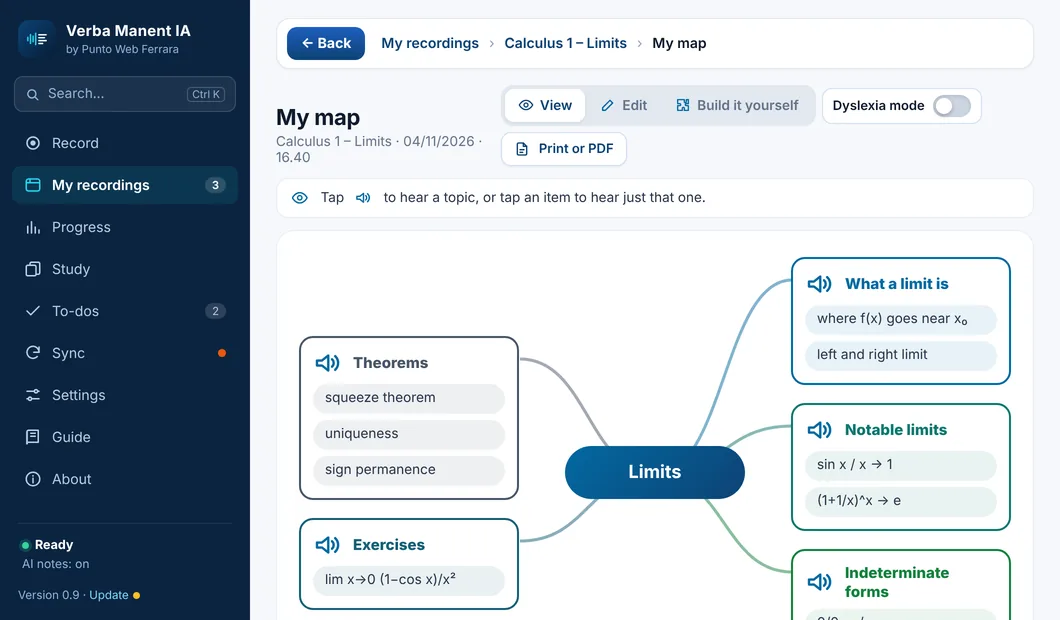
A few tricks make the map easier to read and remember:
- key words, not sentences: three or four words per box at most;
- a large, clear font, always the same, with plenty of space between boxes;
- few colours, each with a fixed meaning: for example blue for definitions, green for examples, orange for dates;
- images and symbols where they help memory, without filling the page;
- one map per topic: three simple maps are better than one giant one;
- always A4, if you’ll bring it to a test.
The map in a test
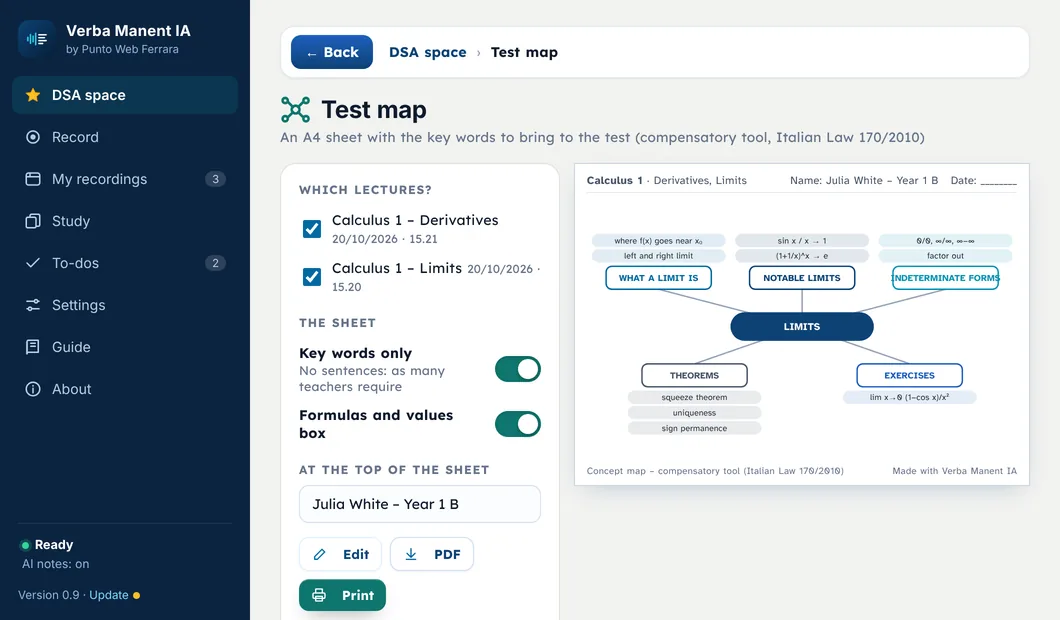
A map can be written into the student’s plan (an IEP or 504 plan in the US, a SEN support plan in the UK), but in a test it only works if it’s clear what it may contain. Many teachers ask for:
| What teachers often ask for | Why |
|---|---|
| Key words only, no full sentences | Otherwise the map becomes the answer |
| Formulas and values in a separate box | They’re what memory lets down most |
| Seeing it before the test, sometimes signing it | To check it’s a map and not a summary |
| Name, class and date at the top | To recognise it and keep it with the test |
The most useful tip: agree on the rules with your teacher at the start of the year, not on test day. And bring a sample map: it’s the fastest way to find out what they accept.
- A different app for every tool
- Maps built by hand after every lecture
- Text-to-speech reads, but it isn't your lecturer's voice
- Every tool in one place
- A test map ready from your lectures
- Karaoke with the lecturer's real voice
What to make it with
| Tool | Pros | Cons |
|---|---|---|
| Pen and paper | Drawing it by hand helps memory | Slow to correct and redo neatly |
| Mapping software (for example CmapTools, free, from Novak’s group) | Everything can be moved and corrected, prints clean | You have to learn to use it |
| Apps that build it from the lecture | The base is ready in seconds | It needs reviewing: a map really works when you work on it yourself |
Whatever you use, remember what the research says: the map helps most while you build it. If you start from a ready-made map, make it yours: remove, add, change the linking words.
The most common mistakes
- Writing full sentences in the boxes.
- Linking with arrows but no words: it’s unclear why two concepts are connected.
- Putting everything in a single map.
- Using ten different colours with no meaning.
- Bringing a map to a test that the teacher has never seen.
- Studying from someone else’s map without reworking it.
Sources
- Novak, J. D., Cañas, A. J. (2008). The Theory Underlying Concept Maps and How to Construct and Use Them. Technical Report IHMC CmapTools 2006-01 Rev 01-2008, Florida Institute for Human and Machine Cognition. PDF
- Nesbit, J. C., Adesope, O. O. (2006). Learning With Concept and Knowledge Maps: A Meta-Analysis. Review of Educational Research, 76(3), 413-448. doi:10.3102/00346543076003413
- Schroeder, N. L., Nesbit, J. C., Anguiano, C. J., Adesope, O. O. (2018). Studying and Constructing Concept Maps: a Meta-Analysis. Educational Psychology Review, 30, 431-455. doi:10.1007/s10648-017-9403-9
Verba Manent puts every assistive tool in one place
The tools in order: in class, after the lecture, for the test, for your teacher.
The lecturer's real voice with the words lighting up.
An A4 sheet with key words and formulas, with name and class.
The sheet for your school plan or university.